
Whats New? - December 2025
Wrapping up the end of the year, we're here to show off a couple of the improvements to the Fulfillments section in Report Toaster.
Let's take a look.
Fulfillments by Location
Many of our merchants run fulfillments from multiple locations, which means they often need a summary to determine their relative performance.
This report is designed to show you the number of Orders, Quantity (items), and Net Sales for the fulfillments at each location.
By default, the report looks at any successful fulfillments in the last 30 days (but this is of course adjustable).
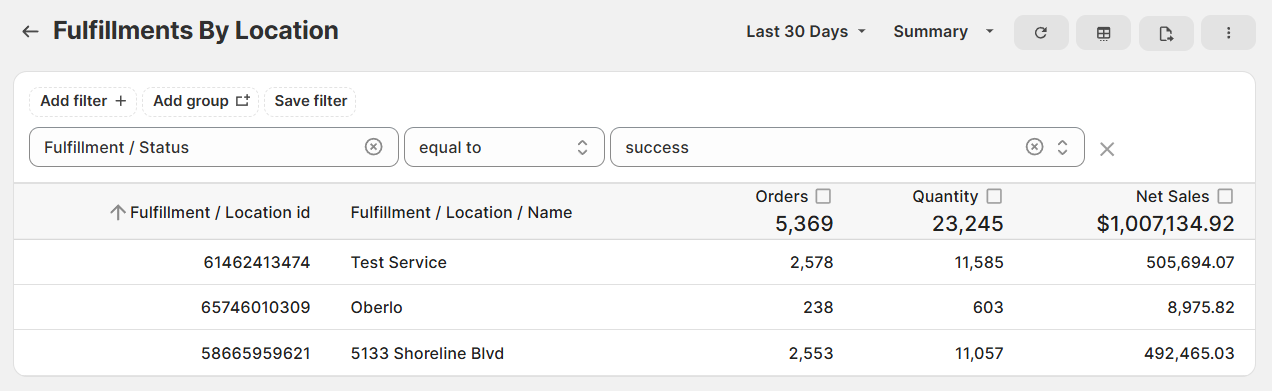
(click image to enlarge)
This report provides a high-level overview with a summary of the totals, but it's also a great starting point for making detailed custom reports.
For example, you can add columns like Order Name, Customer Name, Product Title, and SKU. This would let you see where every individual order and item is being fulfilled.
See our main guide here for further information.
Fulfillments - Other Changes
And just to round out the end of the year, we figured we'd make a few quick improvements to the other reports in the Fulfillments section:
Fulfillment / Location / Name now pulls directly, so you can include this as a column or filter without needing a custom field to map it from the ID.
Like Fulfilled Orders and Fulfilled Line Items, we've split Unfulfilled Orders into two so you can decide if you want the results grouped by Order or by Line Item.
We've gotten a few questions about our Product Pick List report lately, so we created a separate guide that goes over the various filters, metrics filters, and how they're used.
If you have any questions or need help in setting up something specific for your account, feel free to reach out to us at [email protected]
Until next time!